If you run a business or manage a marketing strategy in 2026, you've probably heard about the crucial importance of structured data for natural referencing (SEO) and AI Answer Optimization (AEO). However, technical terms like «Schema.org,» «JSON-LD,» or «Microdata» can seem intimidating, giving the impression that this is a field exclusively reserved for web developers.
The reality is quite different. Understanding and implementing structured data doesn't require coding complex applications. It simply involves adopting a standardized vocabulary that allows machines, whether it's Google or ChatGPT or Perplexity to precisely understand the meaning of your content, not just read it. In this practical guide, we will demystify Schema.org and JSON-LD, explain why they have become indispensable, and show you how to use them concretely to increase your visibility.

What is Schema.org and why is it essential?
Schema.org is a collaborative project founded in 2011 by the major search engines (Google, Bing, Yahoo, and Yandex). Its goal is to create a common, standardized vocabulary for structuring data on the web. Imagine Schema.org as a universal dictionary that all machines understand perfectly.
When a search engine crawls a typical web page, it sees text, images, and HTML tags (like headings or paragraphs). It must then use complex algorithms to guess what the page is about. For example, if a page contains the word «Avatar,» the search engine has to figure out whether it refers to the famous science fiction film, a user profile picture, or a Hindu incarnation.
Structured data removes this ambiguity. By using the Schema.org vocabulary, you explicitly declare to machines: «This page is about a Movie, with the title Avatar, directed by James Cameron, released in 2009.» You go from inference (letting the machine guess) to declaration (telling the machine exactly what it is).
The impact on search results (Rich Results)
The most visible advantage of implementing Schema.org is obtaining Rich Results in Google. Instead of a simple blue link, your page can display with star ratings, an image carousel, real-time product pricing, or a list of frequently asked questions (FAQs) directly clickable from the results page.
These rich results take up much more visual space and naturally catch the user’s eye. Studies consistently show that pages featuring rich results see their click-through rate (CTR) increase by 20 to 40 % compared to standard results. According to a case study published by Google, Rotten Tomatoes saw a 25 % increase in its click-through rate after adding structured data to 100,000 pages.
The Major Challenge of 2026: Citations by Artificial Intelligence
While enriched results are important, the main challenge in 2026 lies in optimizing for AI-based answer engines (ChatGPT, Claude, Google AI Overviews). These systems rely heavily on structured data to extract reliable and factual information.
When an AI system needs to generate a response and cite its sources, it will always prioritize a page with a clear, machine-readable structure. A web page with complete Schema.org markup (clearly identifying the author, publication date, answered questions, and key sections) is three times more likely to be cited by an AI than an unstructured page. This is the very foundation of Answer Engine Optimization (AEO).

JSON-LD: The Recommended Format by Google
Schema.org vocabulary can be integrated into your website in several ways (Microdata, RDFa, JSON-LD). However, as of 2026, the debate is over: JSON-LD is the gold standard.
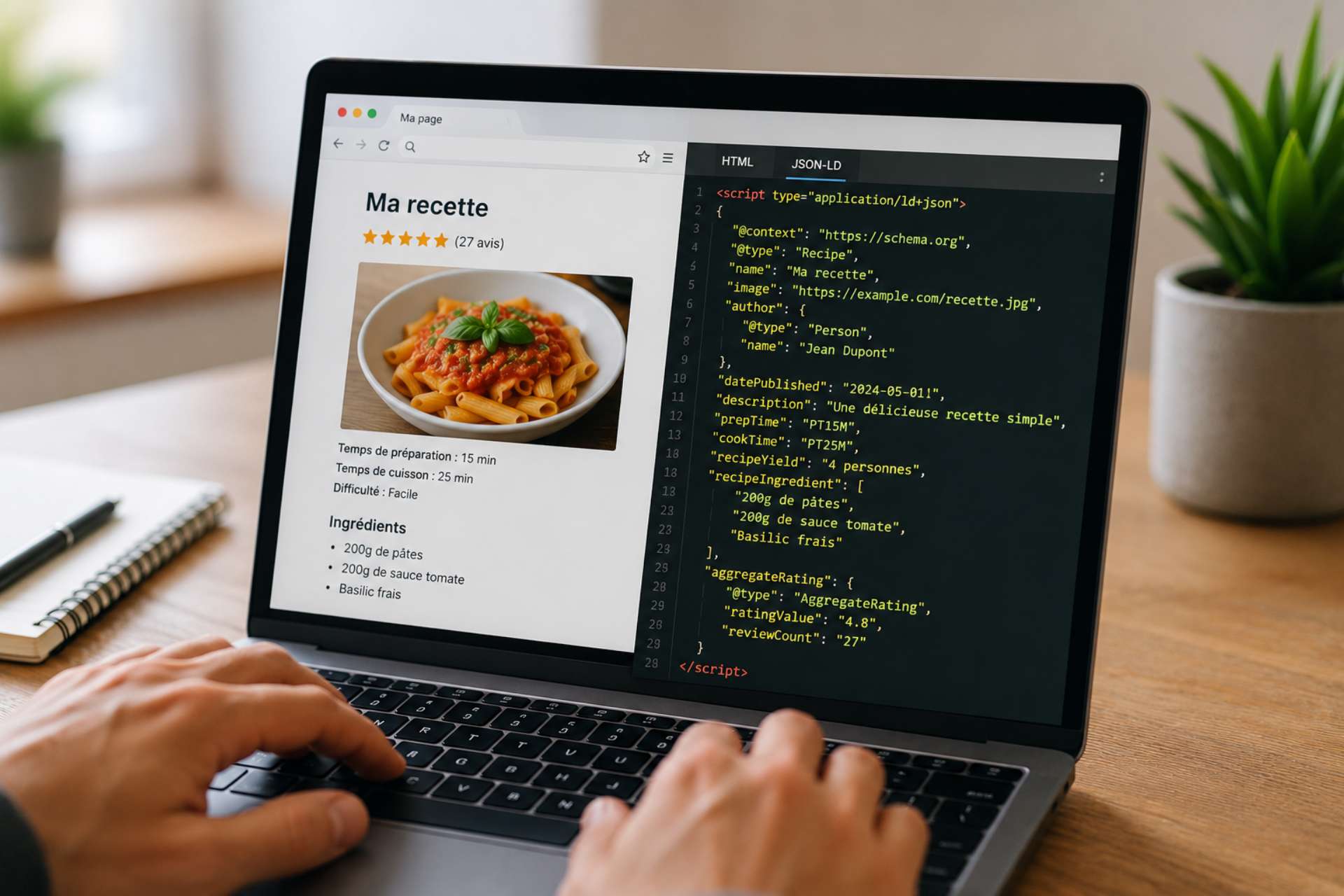
JSON-LD (JavaScript Object Notation for Linked Data) is the format explicitly recommended by Google. Its huge advantage for non-developers is that it completely separates structured data from the visual content of your page. Unlike older formats (Microdata), which required you to insert complex tags in the middle of your HTML paragraphs, JSON-LD takes the form of a simple block of code (a script) that you place discreetly in the header (<head>) or the body (<body>) on your page.
This separation means you can change your site's design without risking breaking your structured data—and vice versa. It's clean, easy to maintain, and perfectly readable by search engines.H
The 5 Most Useful Schema Types for Your Business
The Schema.org dictionary contains hundreds of different types, but you only need to master a handful of them to achieve 90 % results. Here are the five most strategic types for 2026.
1. Organization
This is absolutely essential. This markup must be included on your homepage. It tells search engines your company’s official name, your logo, your contact information, your social media profiles, and your founders. This is what feeds the «Knowledge Graph» (the large information box that appears to the right of Google search results when someone types in your brand name).
2. LocalBusiness (Local Business)
If you have physical retail locations or offices that are open to the public, this markup is essential. It allows you to specify your hours of operation, your exact address, your service area, and your geographic coordinates. It is essential for local SEO and visibility on Google Maps.
3. Article / Blog Post (Blog Post)
Add this to all your blog posts or news articles. This markup specifies the post title, the author (very important for Google’s authority and E-E-A-T), the publication date, the update date, and the featured image. It helps your content appear in news carousels.
4. Product
The key to success in e-commerce. Product markup provides details on the product name, brand, price, currency, in-stock availability, and—most importantly—customer reviews and the average rating. This is what generates the famous yellow stars in search results, drastically increasing the click-through rate.
5. FAQ Page (Frequently Asked Questions)
The secret weapon for AI optimization. If your page contains a list of questions and answers, the FAQPage markup explicitly tells machines which questions are being asked and what the exact answers are. This is the most direct way to provide ready-to-use answers to virtual assistants and search engines.


How can you implement JSON-LD without coding?
You don't need to write the JSON-LD code by hand. In 2026, there are several simple methods available to you.
Method 1: Use Online Generators
There are many free tools (such as the Merkle Generator or Schema Markup Generator) that let you fill out a simple form (name, address, image URL). The tool instantly generates the perfect JSON-LD code snippet. All you have to do is copy that snippet and paste it into your web page (via your CMS or Google Tag Manager).
Method 2: Use CMS Plugins (WordPress, Shopify)
If you use a CMS like WordPress, popular SEO plugins (Yoast SEO, RankMath, SEOPress) automatically handle the creation of JSON-LD for the basic types (Article, Organization, Breadcrumb). All you have to do is fill out the usual fields in your post, and the plugin will translate that information into invisible structured data.
Method 3: Artificial Intelligence Assistance
You can simply ask ChatGPT or Claude to generate the code for you. For example: «Generate FAQPage-type JSON-LD markup for the following three questions and answers: [insert your Q&As].» The AI will provide you with clean code that’s ready to copy and paste.
The Crucial Step: Validation
A syntax error (a missing comma or a misplaced quotation mark) will make your JSON-LD code unreadable to Google. It is therefore essential to always test your code before publishing it.
Google offers a free, official tool: the Rich Results Test. You just need to paste your code or the URL of your page there. The tool will instantly tell you if your markup is valid, if any required properties are missing, and will show you a preview of what your result will look like on Google.

Technical support for an advanced strategy
While the implementation of basic markups is accessible to everyone, the setup of a large-scale structured data strategy (across thousands of e-commerce pages) or the use of advanced markups (like the property Speakable (to specifically target voice assistants and AIs) requires in-depth technical expertise.
At Flowr Agency, we systematically integrate Schema.org and JSON-LD optimization into our visibility strategies. We ensure your site speaks the language fluently Search engines and artificial intelligences, ensuring that your content is not only indexed, but above all understood, highlighted, and cited. Discover how our expertise in Email marketing strategy And technical SEO can transform your digital acquisition.
Frequently Asked Questions about Schema.org and JSON-LD
What is the difference between Schema.org and JSON-LD?
Schema.org is the vocabulary (the dictionary) that defines the terms you can use to describe your content (such as «Article,» «Author,» «Price»). JSON-LD is the technical format (the grammar) recommended by Google for writing this vocabulary on your web page. You use the JSON-LD format to express the concepts defined by Schema.org.
Should I use JSON-LD or Microdata in 2026?
You must use JSON-LD. This is the format explicitly recommended by Google. Unlike Microdata, which is intertwined with your visible HTML code and difficult to maintain, JSON-LD is an independent block of code (a script) placed in the header of your page. It is cleaner, easier to generate, and less prone to errors during redesigns.
Do structured data directly improve Google rankings?
Structured data is not a direct ranking factor (it won’t magically move you from page 2 to page 1). However, it enables Rich Results, which significantly increase your click-through rate (CTR). Furthermore, by helping Google and AI systems accurately understand your content, it ensures that you’re indexed and featured for the most relevant search queries.
How many types of Schema can I put on a single page?
You can (and often should) combine multiple types of Schema on the same page, as long as they accurately reflect the visible content. For example, a cooking recipe page should include «Recipe» markup, but also «BreadcrumbList» (for the breadcrumbs) and «FAQPage» if you are answering common questions about the recipe. The important thing is to logically nest these elements or declare them clearly in your JSON-LD.
How can I check if my JSON-LD markup is working correctly?
You should never deploy structured data without testing it first. Use Google’s official tool, the «Rich Results Test,» or the official Schema.org validator (validator.schema.org). These tools will immediately tell you if your code contains syntax errors or if it’s missing any required properties to be eligible for Google’s special displays.
What is the «Speakable» property, and why is it important for AI?
The "Speakable" property in Schema.org lets you tell search engines and AI assistants which specific sections of your text are particularly suitable for being read aloud or quoted directly. In 2026, with the rise of AI-powered answer engines (AEOs), using this property significantly increases your chances of having your content used as a direct source in AI-generated answers.
Can I add Schema Markup for information that is not visible on the page?
No, this is a clear violation of Google’s guidelines. Structured data must accurately describe the content that is actually visible to the user on the page. Adding JSON-LD markup for hidden, misleading, or irrelevant information is considered structured data spam and may result in a manual penalty from Google, which would disqualify you from rich results.



 Français
  English