Markup

Allows to add annotations / comments directly on a web page. Ideal for feedback between developers and web designers for example.

Why use Markup ?

Markup is a term that refers to the structure and annotations that are added to a document to make it easier to read and interpret by software. These annotations can be in the form of tags, keywords or codes that are inserted into the document and tell software how to present or process the information.

Markup is used in many different contexts, including online content publishing, electronic document creation and database management.

There are many different markup languages, each with its own rules and conventions. The best known is probably HTML (HyperText Markup Language), which is used to structure and format the content of web pages. HTML uses tags to define the different elements of a page, such as titles, paragraphs, lists, links and images.

XML (eXtensible Markup Language) is another markup language commonly used to structure and exchange data. It is more flexible than HTML, as it has no predefined tags and allows users to create their own tags.

Markdown is a lightweight markup language that was designed to be easy to read and write. It is often used to write online documents, such as blog posts or forum messages.

Markup is also used in the creation of electronic documents, such as PDF files or Word documents. These documents often use hidden code to define text formatting, margins, headings, tables and other formatting elements.

In summary, markup is an essential tool for structuring and presenting data in a consistent and easily understandable way. It is used in many different contexts and there are many different markup languages, each with its own specific characteristics and uses.
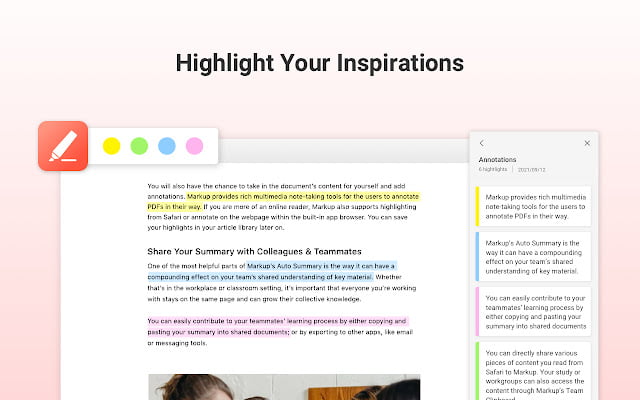

Key benefits of Markup

Overview

Allows you to add annotations / comments directly on a web page

Discover Markup now

#art
AI art generator based on Stable Diffusion. Their website describes them as "an independent research laboratory exploring new mediums of thought and developing the imaginative powers of the human species."
#resources
AI Experiments is Google's showcase for simple experiments that make it easier for anyone to start exploring machine learning, through pictures, drawings, language, music, etc. You can find tools like TalkToBooks and TeachableMachine here.
#Motion design
The perfect package for all 3D artists who want to achieve breathtaking results quickly and without hassle.
#Pdf
TinyWow is a tool that allows you to convert, merge, protect and optimize your PDF files but also to resize a video or to convert a JPG image.
#Colors
Adobe Color offers ready-to-use or create your own color themes.
#Builders
Create your own website without writing code using only Google Sheets.
#Emailing
Tutanota is a secure mailbox that offers email encryption for both storage and transport. With Tutanota, you can create password encrypted emails, thus ensuring the privacy of your emails. Emails are stored on secure servers and are protected by a strong encryption system. Tutanota also allows you to send encrypted emails to recipients who do not have Tutanota. Moreover, you can manage your emails, contacts and calendars in a single application. Tutanota is a secure email solution that offers excellent privacy protection and can be used to send confidential and private messages.

In the same category